What Is TikVid?
TikVid is a simple online tool that helps you download videos, photos, slideshows, and music from TikTok. It is designed for people who want an easy and reliable way to save TikTok content without watermarks and without complicated steps.
You don’t need to create an account, install an app, or log in with your TikTok profile. Just copy a TikTok link, paste it into TikVid, and download your content in a few seconds. Everything works directly in your web browser.
TikVid works smoothly on computers, phones, and tablets. Whether you are using Windows, macOS, Android, or iPhone, you can access TikVid anytime and download TikTok content without hassle.
Why People Choose TikVid
Download TikTok Videos Without Watermark
Many users choose TikVid because it allows them to download TikTok videos without the TikTok logo. The saved videos look clean and original, which is useful if you want to rewatch, edit, or share them later.
This feature is especially helpful for creators, editors, and anyone who prefers videos without distracting watermarks.
High-Quality Video Downloads
TikVid preserves the original video quality as much as possible. If a TikTok video is available in HD or higher resolution, TikVid will try to provide the best quality version for download.
Download TikTok Photos and Slideshows
TikTok now supports photo posts and slideshows, and TikVid fully supports them. You can download photos one by one or easily save the entire slideshow, which many other tools do not offer.
Download TikTok Music as MP3
If you like a TikTok sound or background music, TikVid lets you download the audio as an MP3 file. This makes it easy to listen offline or save your favorite sounds.
No Login, No Installation
TikVid respects your privacy. You don’t need to sign in or install any software. Everything works online, making the process fast and secure.
Unlimited and Free to Use
There are no limits on how many videos or files you can download. TikVid is completely free, and you can use it as often as you like.
What You Can Download with TikVid
TikVid supports most public TikTok content, including:
-
TikTok videos without watermark
-
TikTok videos with watermark (optional)
-
TikTok photo posts
-
TikTok slideshows
-
TikTok audio in MP3 format
Please note that TikVid only works with public TikTok posts. Private or restricted videos cannot be downloaded.
How to Use TikVid
Download TikTok Videos on a Computer
-
Open TikTok and copy the link of the video you want to download

2. Go to the TikVid website
3. Paste the link into the input box
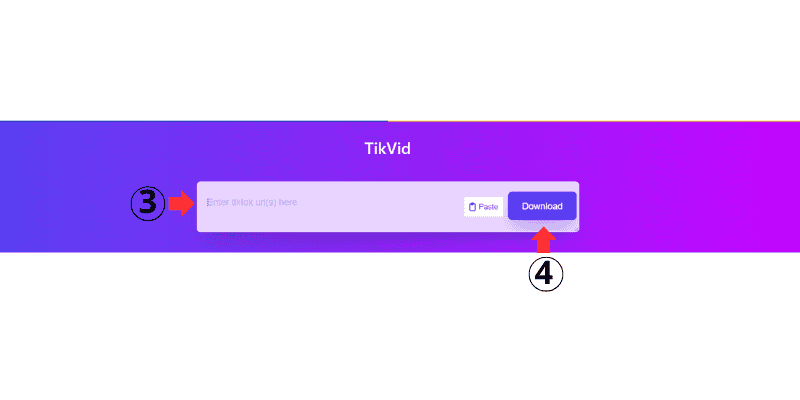
4. Click the download button
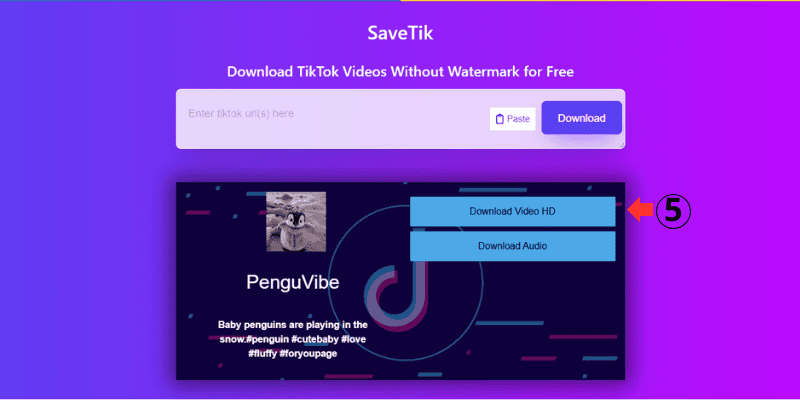
5. Choose a format or quality and save the file
Download TikTok Videos on Android
TikVid works well on Android browsers like Chrome and Samsung Internet. The steps are the same as on a computer, and downloaded files are saved directly to your device.
Download TikTok Videos on iPhone
On iPhone, you can use Safari or Chrome to access TikVid. After downloading, videos are usually saved to the Files app or Photos, depending on your iOS version.
Download TikTok Photos
Download TikTok MP3 Audio
Is TikVid Free?
Yes. TikVid is completely free to use. There are no subscriptions, no hidden costs, and no registration required. All main features are available to everyone.
Is TikVid Safe and Legal?
Safety
TikVid does not ask for personal information and does not store your downloaded files. Since there is no software installation, the risk of malware is very low.
Legal Use
TikVid is meant for personal use. If you plan to use downloaded content for commercial purposes, make sure you have permission from the original creator and follow copyright rules.
TikVid Compared to Other TikTok Downloaders
Many TikTok downloader tools exist, but users often prefer TikVid because it is simple, clean, and reliable. Compared to other tools, TikVid offers:
These small details make a big difference for regular users.
Devices and Platforms Supported
TikVid works on:
-
Windows and macOS computers
-
Android phones and tablets
-
iPhone and iPad
-
Popular browsers like Chrome, Edge, Firefox, and Safari
You only need an internet connection and a browser.
How People Use TikVid
Content Creators
Creators use TikVid to save reference videos, study trends, and keep inspiration for future projects.
Marketers
Marketers download TikTok videos to analyze content ideas, competitors, and advertising styles.
Students and Teachers
Educational TikTok videos can be saved for offline viewing, lessons, or presentations.
Everyday Users
Many people simply use TikVid to save their favorite TikTok videos, photos, or sounds for later.
TikVid – A Simple Way to Save TikTok Content
TikVid is made for people who want a straightforward way to download TikTok videos, photos, and music. It’s fast, free, and easy to use on any device.
If you are looking for a no-watermark TikTok downloader that just works, TikVid is a practical choice.
Try TikVid today and save your favorite TikTok content with ease.